tries
tries converts a list of hostnames, IPs, paths, or tokens into a
trie and outputs Graphviz DOT.
You can then use Graphviz to render the text output into PDF, PNG, SVG, etc.
A trie is a tree-like structure used for storing strings in a way that exposes shared prefixes.
It is useful for:
- Visualising naming conventions
- Discovering embedded structure in text
- Analysing patterns in hostnames, IPs, or path structures
- Documenting legacy naming schemes
- Seeing structure that is usually hidden
- Making interesting diagrams from plain text lists
There are no Python dependencies to produce DOT output.
Graphviz is needed if you want to render the DOT into PDF or PNG.
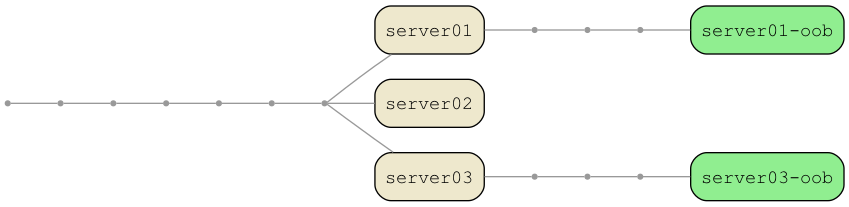
Features
- Reads from files or STDIN
- Character-level trie mode
- Token mode via
-D "CHAR" - Themes (color + text presets)
- Per-node color overrides
- Per-node text color overrides
- Case-insensitive tries (
--ignore-case) - Windows
DOMAIN\hostprefix stripping (--keep-prefix) - Optional FQDN stripping (
--keep-fqdn) - Hide labels (
--no-labels) - Reverse token order (token mode only
--rtl) - Multiple sample datasets:
--sample-hosts--sample-ips--sample-paths--sample-urls--sample-emails--sample-nato
- Automatically combines sample data + file input
- Fully standalone, no imports beyond Python stdlib
- Per-node color control
- normal terminals
- marked terminals
- head node
- Per-node text colors
text_normaltext_marktext_head
- Cross-platform safe font choices
- Case-insensitive filtering and marking
- Theme gallery generator (
generate-gallery.sh) - Feature example renderer (
generate-examples.sh) - Behaviour test suite (
test_tries.py, no Graphviz needed) - Man page (
tries.1) - Simple
--versionflag and--debugoutput
Installation
Requirements:
- Python 3.6+
- Graphviz (only for rendering — not required to produce DOT output)
Install Graphviz on macOS:
brew install graphviz
Quick install (single file)
tries is a single Python script with no dependencies. The quickest way to
install it is to copy it somewhere in your $PATH:
curl -o ~/.local/bin/tries \
    https://raw.githubusercontent.com/rdmarsh/tries/main/tries.py
chmod +x ~/.local/bin/tries
This gives you the base tool. For the full theme set, also install themes.py:
mkdir -p ~/.local/share/tries
curl -o ~/.local/share/tries/themes.py \
    https://raw.githubusercontent.com/rdmarsh/tries/main/themes.py
Install with make
Clone the repo and use the Makefile:
git clone https://github.com/rdmarsh/tries.git
cd tries
make install
This installs:
tries→$PREFIX/bin/triesthemes.py→$PREFIX/share/tries/themes.pytries.1→$PREFIX/share/man/man1/tries.1
Default PREFIX is $HOME. Override it:
make install PREFIX=/usr/local
Uninstall:
make uninstall
Man page
After make install, the man page is available:
man tries
Basic Usage
Render a trie from a file:
./tries.py servers.txt | dot -Tpdf -o trie.pdf
Render PNG:
./tries.py servers.txt | dot -Tpng -o trie.png
Read from STDIN:
cat servers.txt | ./tries.py | dot -Tpng -o trie.png
Print the version and exit:
./tries.py --version
Enable debug logging:
./tries.py --debug file.txt
Examples
Hosts
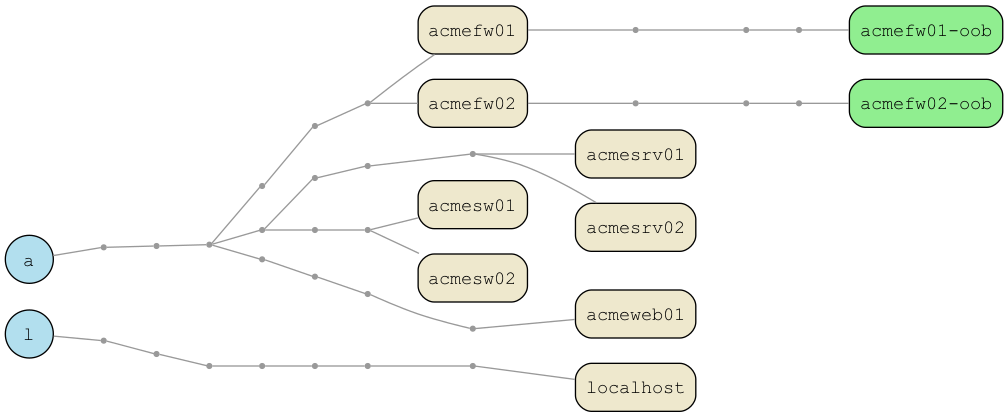
This image was generated using:
./tries.py --sample-hosts -H -M oob \
    | dot -Tpng -o example_hosts.png
This example demonstrates:
- Default theme (
warm-sand) - Head-nodes (
-H), which formats the head node as a circle - Character-mode
- Marking rules (
-M), which marks nodes with the text as a different color - Built-in sample hosts dataset
Paths
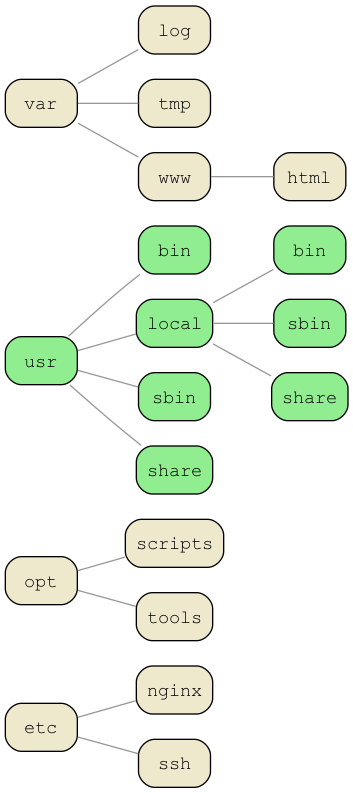
This image was generated using:
./tries.py --sample-paths -D "/" -M usr \
    | dot -Tpng -o example_paths.png
This example demonstrates:
- Default theme (
warm-sand) - Token-mode (
-D), for delimiter-based tries (Paths) - Marking rules (
-M), which marks nodes with the text as a different color - Built-in sample paths dataset
IPs
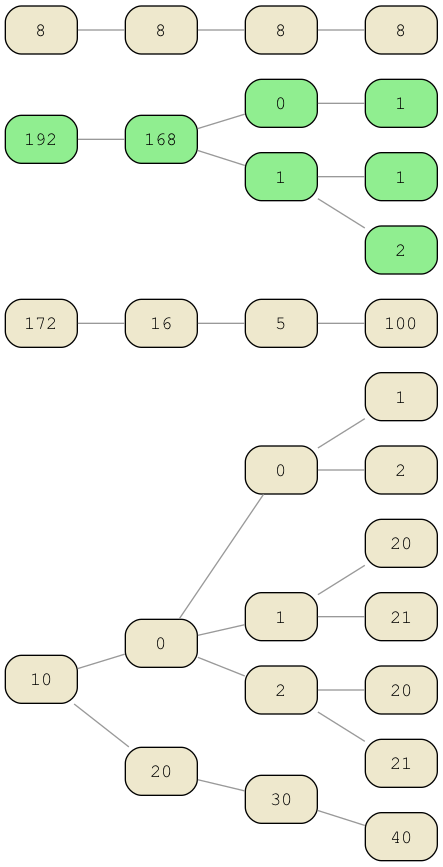
This image was generated using:
./tries.py --sample-ips -D "." -M 192 \
    | dot -Tpng -o example_ips.png
This example demonstrates:
- Default theme (
warm-sand) - Token-mode (
-D), for delimiter-based tries (IPs) - Marking rules (
-M), which marks nodes with the text as a different color - Built-in sample IP dataset
URLs
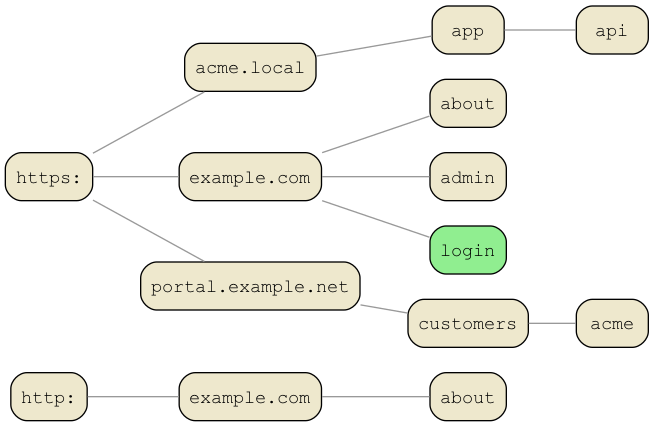
This image was generated using:
./tries.py --sample-urls -D "/" -M login \
    | dot -Tpng -o example_urls.png
This example demonstrates:
- Default theme (
warm-sand) - Token-mode (
-D), for delimiter-based tries (URLs) - Marking rules (
-M), which marks nodes with the text as a different color - Built-in sample url dataset
Themes
Themes define all colors for:
- Normal terminal nodes
- Marked terminal nodes
- Head node (
-H) - Edges
- Point nodes
- Node text colors
List available themes:
./tries.py --list-themes
To use a theme, for example midnight:
./tries.py --sample-hosts -T midnight | dot -Tpdf -o midnight.pdf
Generate a gallery:
./generate-gallery.sh
Custom Themes
You can save your current color and text overrides as a reusable theme:
./tries.py \
    -cn lightskyblue1 \
    -cm mediumspringgreen \
    -ch royalblue3 \
    -ce cyan3 \
    -cp gray50 \
    -tn black \
    -tm black \
    -th white \
    --save-theme electric-dusk
This creates (or updates) themes_custom.py with a theme called
electric-dusk.
You can then use it later:
./tries.py --sample-hosts -T electric-dusk | dot -Tpng -o dusk.png
Colors and Fonts
All colors used by tries.py - including theme colors and CLI overrides - use the X11 color palette supported by Graphviz.
This means you can use any standard color name such as cornsilk2, palegreen3, royalblue3, gray60, or lightskyblue1 without needing hex codes.
The full list of valid color names is available here:
https://graphviz.org/doc/info/colors.html
Theme Color Overrides
Override theme colors with:
-cn,--color-normal-cm,--color-mark-ch,--color-head-ce,--color-edge-cp,--color-point
Example:
./tries.py --sample-hosts -H -T warm-sand \
    -cn mistyrose -ch skyblue \
    | dot -Tpdf -o custom.pdf
Font Color Overrides
Override per-node label colors:
-tn,--text-normal(normal terminal)-tm,--text-mark(marked terminal)-th,--text-head(head node)
Example:
./tries.py --sample-hosts -H -T nightfall -th black \
    | dot -Tpdf -o out.pdf
Font Family Selection
Use a safe cross-platform font family:
-F courier-F courier-new-F dejavu-F liberation-F nimbus-F helvetica-F menlo-F consolas
Example:
./tries.py --sample-hosts -F menlo | dot -Tpdf -o out.pdf
Filter Input (-f)
Filter text via regex:
./tries.py -f 'fw' servers.txt
Filtering is case-sensitive.
Invert Filter (--invert-filter)
Sometimes it’s easier to filter out patterns instead of matching them.
Use --invert-filter to keep every line not matching -f:
./tries.py -f 'oob' --invert-filter
This keeps everything except lines containing “oob”.
Useful for:
- excluding environments
- excluding “oob” or “mgmt” hosts
- excluding high-noise patterns
- cleanup passes
Marking Terminal Nodes
Use --mark (-M) with regex patterns:
./tries.py -M 'prod$' servers.txt
Multiple patterns:
./tries.py -M 'oob$' 'fw$' 'lm[0-9][0-9]$' servers.txt
Regex is case-sensitive.
Head Node Rendering
To display the first character as a filled circle:
./tries.py -H servers.txt
Case-Insensitive Tries (--ignore-case)
To treat upper and lower case as equivalent in the trie:
./tries.py --ignore-case servers.txt
This normalises internal trie IDs but keeps labels unchanged.
When --ignore-case is enabled:
- Internal trie nodes IDs are lowercased
- Mixed-case variants (e.g.
acmeweb01andACMEWEB02) share the same root path - Labels retain their original case
- Prevents mixed-case duplication caused by case-only differences
When --ignore-case is not set, case is preserved in node IDs and the trie
structure is strictly case-sensitive.
DOMAIN\host Prefixes
Strip:
ACME\server01
ACME\server02
Normally becomes:
server01
server02
To keep the domain prefix:
./tries.py --keep-prefix
Including FQDN
Input:
server01.domain.local
Default becomes:
server01
Keep the full FQDN:
./tries.py --keep-fqdn
Removing Labels
Remove labels from terminal and head nodes:
./tries.py --no-labels
Right-to-Left Token Order (--rtl)
Some structured strings are naturally hierarchical from the right rather than the left
--rtlonly applies in token mode (-Dis used)- Useful for emails or domain names
Using token mode (-D), the highest-level component appears last, so
a normal left-to-right trie gives an inverted structure. The --rtl
flag fixes this by reversing the token order after splitting,
producing a more logical root
./tries.py --sample-emails -D '@' --rtl
Sample Datasets
The sample flags are useful for:
- Testing themes
- Rendering example outputs
- Verifying colors and texts
- Ensuring Graphviz output works
./tries.py --sample-hosts
./tries.py --sample-ips
./tries.py --sample-paths
./tries.py --sample-urls
./tries.py --sample-nato
Output Format
DOT output always goes to STDOUT unless -o is used.
Example DOT output:
graph tries {
  graph [fontname="Courier"];
  node  [fontname="Courier"];
  rankdir="LR";
  "a" [shape="point"];
  "ac" [shape="Mrecord", label="ac"];
  { rank = same; "a" }
  "a" -- "ac";
}
Render (using Graphviz):
dot -Tpdf -o trie.pdf
Workflow Example
./tries.py servers.txt -H -T safe \
    | dot -Tpdf -o networks.pdf
Development
Running the tests
test_tries.py is the behaviour test suite. It imports tries directly and asserts on DOT output — no Graphviz required.
python3 test_tries.py
Or with pytest if you have it installed:
pytest test_tries.py -v
Or via make:
make test
Generating examples
generate-examples.sh renders the feature examples to EXAMPLES/tests/ as DOT and PNG. Requires Graphviz.
make examples
Generating the theme gallery
generate-gallery.sh renders all themes to EXAMPLES/ as PDFs. Requires Graphviz.
./generate-gallery.sh
License
GPLv3 (c) David Marsh 2019–2025